Friday, 14 October 2011

How to add where condition to the sql stament....?

public void processFormRequest(OAPageContext pageContext, OAWebBean webBean)
  {
    super.processFormRequest(pageContext, webBean);
    String resourceId=pageContext.getParameter("ResourceId");
    OAApplicationModule am = pageContext.getRootApplicationModule();
     String projectId = (String)pageContext.getSessionValue("paProjectId");
    String sWhereClauseValue = "";

    String dynVoQuery = "SELECT ppp.person_id, ppp.start_date_active, ppp.end_date_active  FROM pa_project_players ppp, pa_project_role_types ppr,pa_project_parties pp WHERE ppp.project_id = :1 and pp.project_id=ppp.project_id   AND ppp.project_role_type = ppr.project_role_type AND ppr.description = 'Delivery Manager' AND pp.project_role_id =ppr.PROJECT_ROLE_TYPE AND NVL (ppp.end_date_active, NVL (pp.START_DATE_ACTIVE, SYSDATE)) BETWEEN NVL (pp.START_DATE_ACTIVE, SYSDATE) AND NVL (pp.END_DATE_ACTIVE, TO_DATE ('01/01/4712', 'DD/MM/YYYY'))";
    ViewObject dynViewObject = am.findViewObject("ExistingDeliveryMgrVO");
    if(dynViewObject == null)
    {
      dynViewObject = am.createViewObjectFromQueryStmt("ExistingDeliveryMgrVO", dynVoQuery);
//      ExistingDeliveryMgrVORowImpl row=null;
      dynViewObject.setWhereClauseParams(null);
      dynViewObject.setWhereClauseParam(0,projectId);
      dynViewObject.executeQuery();
      if(dynViewObject.getRowCountInRange() >0)
      {
        oracle.jbo.Row row1 = dynViewObject.first();
        if(row1 != null)
        {
          String existingDeliveryMgr = row1.getAttribute(0).toString();
          if(existingDeliveryMgr != resourceId)
          {
            throw new OAException("Duplicate Delivery Manager");
          }
        }
      }

Loop Throught the Fetched Records in VO

Example 1:
 
This particular example was written for Oracle Sourcing.
       OAApplicationModule rootAM = pageContext.getRootApplicationModule();           
       OAViewObject ReqVO   =      (OAViewObject)rootAM.findViewObject("BidHeaderSectionsVO");
           
            if (null!=ReqVO) {
                Row ReqRow = ReqVO.first();           
                if (null != ReqRow) {
                           
                int idx = ReqVO.getRowCount();
   
                for (int xx = 0; xx < idx; xx++) {
                    if (null != ReqRow) {
                       // Do some work....
                       ReqRow = ReqVO.next();
                    }
                    else {}
                }
              }
            }
Example 2:
OAViewObject vo = (OAViewObject)getPPVCMHeadersVO2();
   PPVCMHeadersVORowImpl row = null;
   int fetchedRowCount = vo.getRowCount();
   RowSetIterator insertIter = vo.createRowSetIterator("insertIter");
   if (fetchedRowCount > 0)
    {
     insertIter.setRangeStart(0);
     insertIter.setRangeSize(fetchedRowCount);
     for (int i = 0; i < fetchedRowCount; i++)
      {  
        row = (PPVCMHeadersVORowImpl)insertIter.getRowAtRangeIndex(i);
        row.setAttribute("Sno",new Integer(i+1));
      }
    } 
  insertIter.closeRowSetIterator();

Thursday, 13 October 2011

CSS Class names in OAF

Oracle Application Framework (OAF) Predefined CSS Classes List

as documented in Oracle BLAF Guidelines

commonly used

  • OraFieldText           Updatable Fields
  • OraDataText           Display Only Fields
  • OraPromptText       Used for Prompts, Checkboxes
  • OraLinkText            For Links/URLs
  • OraInstructionText   For Plain Text Instruction

complete list


GENERAL COMPONENT CSS DEFINITIONS
OraBodyused on the element to define the default bgcolor/font family for the entire page
OraApplicationSwitcherTextlabel of Application Switcher
OraPromptTextText Prompts (Labels)
OraDataTextData text string anywhere in page except in tables - also often used for numeric values which don't need to be right-aligned
OraFieldTextText and numeric data in standard Web widget (field, poplist)
OraFieldTextDisabledRenders gray text in disabled form controls such as text fields, radio buttons, check boxes - does not match current BLAF guidelines
OraFieldNumberRight-aligned numeric Data in Field
OraFieldNumberDisabledRenders gray text for disabled Numeric Data fields - does not match current BLAF guidelines
OraInstructionTextInstruction Text
OraInstructionTextStrongInstruction Text with Emphasis
OraPageStampTextPage stamp text
OraPageStampLabelPage stamp label
OraButtonTextAction/Navigation Button Text
OraButtonTextDisabledButton Text - disabled
OraLinkTextLink Text (would be underlined with href tag)
OraVLinkTextvisited link text (would be underlined with href tag)
OraALinkTextactive link text - color change on mouse button down (would be underlined with href tag)
OraGlobalButtonTextGlobal Button Enabled} (This would be an "a href" link
OraGlobalButtonTextSelectedGlobal Button Active
OraGlobalButtonTextDisabledGlobal Button Disabled
OraTipTextTip Text for page or section of page
OraTipLabelTip label (the word "Tip") in bold
OraInlineErrorTextInline Error Text embedded in page content (not in message box; not for other message types)
OraInlineInfoTextInline Info and Hint Text embedded in page content (not in message box; not for other message types)
OraTextInlineVariant of OraInlineInfoText - not specified in current BLAF guidelines
OraErrorHeaderHeader for Error Message Only
OraErrorNameText Error Name Text
OraMessageBoxListnumbered list within message box for list of informational or warning messages (not for error messages)
OraMessageBoxLinkblue links in message boxes - current BLAF guidelines specify brown links
OraMessageBoxParagraphbody text in non-error message boxes
OraMessageBoxErrorListnumbered list in red text within message box for list of error messages
OraMessageBoxErrorLinkblue links in message boxes - current BLAF guidelines specify brown links
OraMessageBoxErrorParagraphred paragraph text in Error message boxes
OraPrivacyLink in Footer to Privacy Statement
OraCopyrightCopyright Statement Text in Footer
OraCalendarTitleTitle of Date Picker - usually name of the month
OraCalendarHeaderDate Picker column headers - usually days of the week
OraCalendarEnabledDays in Date Picker that can be selected
OraCalendarDisabledDays in Date Picker that are invalid for the current context
OraCalendarSelectedSelected days(s) in the in Date Picker
OraShuttleLinkTextLink text placed below each arrow button in the middle of the shuttle
TAB/NAVIGATION/LOCATOR CSS DEFINITIONS
OraNav1SelectedTab [level 1] selected
OraNav1EnabledTab [level 1] enabled
OraNav1DisabledTab [level 1] disabled
OraNav2SelectedHorizontal Navigation [level 2] selected
OraNav2EnabledHorizontal Navigation [level 2] enabled
OraNav2DisabledHorizontal Navigation [level 2] disabled
OraNav3SelectedSide Navigation [level 3] selected
OraNav3EnabledSide Navigation [level 3] enabled
OraNav3DisabledSide Navigation [level 3] disabled
OraNavBarActiveLinkused for enabled NavigationBarBean links (a "next" link when there are more items to view.)
OraNavBarInactiveLinkused for NavigationBarBean Next/Previous links when there are no more Next/Previous contents to be viewed
OraNavBarViewOnlyused for the step text (such as "Step 1 of 5") in a single-item NavigationBarBean
OraTrainActivecurrent page in step-by-step locator a.k.a. "train"
OraTrainVisitedvisited page(s) in step by step locator a.k.a. "train"
OraTrainUnvisitedpage(s) not yet visited page in step-by-step locator a.k.a. "train"
OraCrumbsSelectedcurrent page (without link) in breadcrumbs
OraCrumbsEnabledPages higher in the hierarchy (with links enabled) in breadcrumbs
HEADER CSS DEFINITIONS
OraHeaderStandard dark blue header on white background
OraHeaderSubStandard dark blue subheader on white background
OraHeaderSubSubStandard dark blue subsubheader on white background
OraDarkHeaderDark Header on dark beige in Side Navigation of Home page - usually subheader and subsubheader are used instead
OraDarkHeaderSubDark Subheader on dark beige in Side Navigation of Home page
OraDarkHeaderSubSubDark Subsubheader on dark beige in Side Navigation of Home page
OraLightHeaderLight blue header on light or medium beige background for content containers - usually subheader and subsubheader are used instead
OraLightHeaderSubLight blue subheader on light or medium beige background - typically in content containers
OraLightHeaderSubSubLight blue subsubheader on light background - typically in content containers
OraColorHeaderHeader on Blue for content containers - usually subheader and subsubheader are used instead
OraColorHeaderSubSubheader on Blue - typically in content containers
OraColorHeaderSubSubSubsubHeader on Blue - typically in content containers
OraPortletHeaderPortlet Content Header on White - currently only used for a Portal demo
OraDarkPortletHeaderPortlet Content Header on Beige - currently only used for a Portal demo
OraGlobalPageTitleGlobal header when there are no Tab links
TABLE CSS DEFINITIONS
OraTableTitleTable Title - used instead of Subheader when other elements separate the subheader from the table AND no control bar is present
OraTableBackground color for table gridlines
OraTableControlBarTexttext in table Control Bar (band appearing at top of some tables that contains controls)
OraTableColumnHeaderTable Column Header
OraTableColumnHeaderNumbersame as Table Column Header but with right aligned numeric header
OraTableColumnHeaderIconButtonTable Column Header with centered action button
OraTableSortableColumnHeaderSortable Table Column Header -- cursor turns to hand over header cell
OraTableSortableColumnHeaderNumbersortable form of numeric Table Column Header
OraTableSortableColumnHeaderIconButtonsortable form of Table Column Header with centered action button
OraTableRowHeaderTable Row Header
OraTableColumnFooterfor left-aligned text in table column footer, except for totals
OraTableTotalright-aligned "Total" label that appears in footer cell to left of numeric total
OraTableAddTotalleft-aligned "Total" label that appears in column header cell
OraTableTotalNumberright-aligned total value that appears in footer cell below the totalled column
OraTableTotalTextleft-aligned total value -- useful in updateable tables with more than one totaled column
OraTableCellTextTable Cell Text
OraTableCellTextBandTable Cell Text in row with band of color
OraTableCellNumbernumeric Table Cell Text - only required if column features calculations
OraTableCellNumberBandnumeric Table Cell Text in row with band of color - only required if column features calculations
OraTableCellIconButtonTable Cell containing an action/navigation button
OraTableCellIconButtonBandnumeric band color table cell containing an action/navigation button
OraTableCellSelectselect column with check box or radio button
OraTableCellSelectBandselect column with check box or radio button in row with band of color
OraTableVerticalGridTable Background Vertical Grid Color
OraTableVerticalHeaderGridTable Background Vertical Grid Color in Column Header
OraTableHorizontalGridTable Background Horizontal Grid Color
OraTableHorizontalHeaderGridTable Background Horizontal Grid Color in Row Header
OraTableShadowHeaderGridrenders shadow for sortable table headers???
OraTableHeaderLinkUsed for column headers rendered by SortableHeaderBean for headers which aren't sortable
OraTableSortableHeaderLinkLink in Header of Sortable Column
OraTableDetailUsed for details child in conjunction with Hide/Show in a table row
SPACING AND LAYOUT CSS DEFINITIONS
OraIndentHeaderIndents second and later occurrences of subheaders 20 pixels relative to page header
OraSpacingHeaderSpacing for Page Title Header: 7 pixels above and 2 below
OraSpacingHeaderSubSpacing for first SubHeader on page: 10 pixels above and 2 below
OraSpacingHeaderLargeSpacing for second and later occurrences of subheaders: 20 pixels above and 2 below

Monday, 3 October 2011

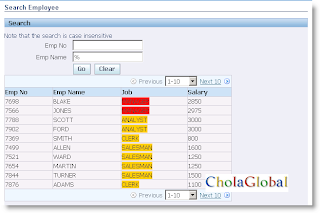
Dynamically Change the color of rows in advanced table region

Step1: Call this below code from ProcessRequest(............,.............) 
OAAdvancedTableBean table = (OAAdvancedTableBean)webBean.
findIndexedChildRecursive("ResultsTable");
OAColumnBean ejobcol = (OAColumnBean)webBean.
findIndexedChildRecursive("Column3");
OAMessageStyledTextBean job = (OAMessageStyledTextBean)ejobcol.
findIndexedChildRecursive("Job");
OADataBoundValueViewObject cssjob = new OADataBoundValueViewObject(job,"Color");
job.setAttributeValue(oracle.cabo.ui.UIConstants.STYLE_CLASS_ATTR, cssjob);
 
Step2: Edit custom.xss and paste the below Code:
Path:   C:\santhoshJdev\jdevhome\jdev\myhtml\OA_HTML\cabo\styles.
Write the following code at <!--Please start your customization at here ----!> 
 
<style selector=".1">
<includeStyle name="DefaultFontFamily"/>
<property name="background-color">#FF0000</property>
</style>
<style selector=".2">
<includeStyle name="DefaultFontFamily"/>
<property name="background-color">#FFCC00</property>
</style 
 
Step 3: save and run...now the output will be


Friday, 30 September 2011

Creation of Side Navigation dynamically...to the page

/*===========================================================================+
| Copyright (c) 2001, 2005 Oracle Corporation, Redwood Shores, CA, USA |
| All rights reserved. |
+===========================================================================+
| HISTORY |
+===========================================================================*/
package cisco.oracle.apps.pa.revenue.webui;

import oracle.apps.fnd.common.VersionInfo;
import oracle.apps.fnd.framework.webui.OAControllerImpl;
import oracle.apps.fnd.framework.webui.OAPageContext;
import oracle.apps.fnd.framework.webui.beans.OAWebBean;
import oracle.apps.fnd.framework.webui.beans.layout.OAPageLayoutBean;
import oracle.apps.fnd.framework.webui.beans.layout.OAStackLayoutBean;
import oracle.apps.fnd.framework.webui.beans.OAWebBean;
import oracle.apps.fnd.framework.webui.OASideBarHelper;
import oracle.apps.fnd.framework.webui.beans.nav.OASideNavBean;
import oracle.apps.fnd.framework.webui.OAWebBeanConstants;
import oracle.apps.fnd.framework.webui.beans.nav.OALinkBean;

/**
* Controller for ...
*/
public class SideNavigationCO1 extends OAControllerImpl
{
public static final String RCS_ID="$Header$";
public static final boolean RCS_ID_RECORDED =
VersionInfo.recordClassVersion(RCS_ID, "%packagename%");

/**
* Layout and page setup logic for a region.
* @param pageContext the current OA page context
* @param webBean the web bean corresponding to the region
*/
public void processRequest(OAPageContext pageContext, OAWebBean webBean)
{
super.processRequest(pageContext, webBean);
createSideNavigation(pageContext, webBean);
}

/**
* Procedure to handle form submissions for form elements in
* a region.
* @param pageContext the current OA page context
* @param webBean the web bean corresponding to the region
*/
public void processFormRequest(OAPageContext pageContext, OAWebBean webBean)
{
super.processFormRequest(pageContext, webBean);
}

public void createSideNavigation(OAPageContext pageContext, OAWebBean webBean)
{
OASideNavBean sideNav = (OASideNavBean)createWebBean(pageContext,
OAWebBeanConstants.SIDE_NAV_BEAN,
null, // no need to specify a data type
"sideNav" // always specify name
);
OAStackLayoutBean search =
(OAStackLayoutBean)createWebBean(pageContext,
"/cisco/oracle/apps/pa/revenue/webui/SideSearchRN",
"SideSearchRN", // always specify name
true); // region created in Oracle
sideNav.addIndexedChild(search);
OAPageLayoutBean pageBean = (OAPageLayoutBean)webBean.findIndexedChildRecursive("pageLayoutRN");

pageBean.addIndexedChild(sideNav);

OALinkBean link1 = (OALinkBean)createWebBean(pageContext,
OAWebBeanConstants.LINK_BEAN,
null,
"AllOfferings");
link1.setText("All Offerings");
link1.setDestination("OA.jsp?page=/cisco/oracle/apps/pa/revenue/webui/AllIOfferingPG&retainAM=Y");
sideNav.addIndexedChild(link1);

OALinkBean link2 = (OALinkBean)createWebBean(pageContext,
OAWebBeanConstants.LINK_BEAN,
null,
"MyOfferings");
link1.setText("My Offerings");
link1.setDestination("OA.jsp?page=/cisco/oracle/apps/pa/revenue/webui/MyOfferingPG&retainAM=Y");
sideNav.addIndexedChild(link2);

OALinkBean link3 = (OALinkBean)createWebBean(pageContext,
OAWebBeanConstants.LINK_BEAN,
null,
"Alerts");
link1.setText("My Offerings");
link1.setDestination("OA.jsp?page=/cisco/oracle/apps/pa/revenue/webui/AlertPG&retainAM=Y");
sideNav.addIndexedChild(link3);
search.render(true);
sideNav.render(true);
link1.render(true);
link2.render(true);
link3.render(true);
pageBean.render(true);
}
}

Monday, 12 September 2011

OAF Page Personalization....adding two columns and button as programatically to the table region


  private void addSelectColumn(OAPageContext pageContext, OAWebBean webBean)
  {
    String voName = "AvailableCCTrxnVO";
   
    OAAdvancedTableBean unUsedCCTxnsTable = (OAAdvancedTableBean)webBean.findIndexedChildRecursive("TransactionsListOnlyT");
   
    if(unUsedCCTxnsTable != null) //If not able to find the table, skip the process
    {
      //Create new column Category to the table
       OAColumnBean categoryCol = (OAColumnBean)createWebBean(pageContext, COLUMN_BEAN, null, "XxcfiCategoryColumn1");
       OASortableHeaderBean column1Header = (OASortableHeaderBean)createWebBean(pageContext, SORTABLE_HEADER_BEAN, null, "XxcfiCategoryColumn1Header1");
       column1Header.setText("Category");
       categoryCol.setColumnHeader(column1Header);
       // Create the actual leaf item under the first column
       OAMessageStyledTextBean leaf1 = (OAMessageStyledTextBean)createWebBean(pageContext, MESSAGE_STYLED_TEXT_BEAN, null, "XxcfiCategoryColumnLeaf1");
       leaf1.setViewAttributeName("Category");
       categoryCol.addIndexedChild(leaf1);
      
      //Create Multi Select Check box
      OAMultipleSelectionBean mBean = (OAMultipleSelectionBean)createWebBean(pageContext, MULTIPLE_SELECTION_BEAN, null, "XxcfiMultiSelect1");
      mBean.setViewUsageName(voName);
      mBean.setViewAttributeName("SelectFlag");
      mBean.setDisabledBinding(new OADataBoundValueViewObject(mBean, "DisableSelection", voName));
      mBean.setText("Select:");
     
      //Create selection button Categorize as Personal and add it to Multi Select Check box
      OASelectionButtonBean categorizePersoanlBtn = (OASelectionButtonBean)createWebBean(pageContext, BUTTON_SELECTION_BEAN, null, "XxcfiCategorizeAsPersonal1");
      categorizePersoanlBtn.setText("Categorize as Personal");
      mBean.addIndexedChild(categorizePersoanlBtn);
     
      /*
      //Create selection button Categorize as Business and add it to Multi Select Check box
      OASelectionButtonBean categorizeBusinessBtn = (OASelectionButtonBean)createWebBean(pageContext, BUTTON_SELECTION_BEAN, null, "XxcfiCategorizeAsBusiness1");
      categorizeBusinessBtn.setText("Categorize as Business");
      mBean.addIndexedChild(categorizeBusinessBtn);
      */

      //Add Multi Select Check box to the table
      unUsedCCTxnsTable.setTableSelection(mBean);
     
      //Add new column Categroy to the table
       unUsedCCTxnsTable.addIndexedChild(categoryCol);
    }
  }


For multiple selection bean item
the following code has to be use for selecting or deselecting


  /*
   * Get the specified VO from application module. If not found in AM, create a view object and return
   */
  public OAViewObjectImpl getVO(OAPageContext pageContext, OAWebBean webBean, String voName, String voPath)
  {
 
      logDebugMessage(pageContext, "Entered getVO", OAFwkConstants.STATEMENT);
      OAApplicationModule am = pageContext.getApplicationModule(webBean);
      OAViewObjectImpl vo = (OAViewObjectImpl)am.findViewObject(voName);
     
      logDebugMessage(pageContext, "vo = "+vo, OAFwkConstants.STATEMENT);
     
      if (vo == null) {
          return (OAViewObjectImpl)am.createViewObject(voName, voPath);
      }

      String path = vo.getViewDefinition().getFullName();
      if (path.equals(voPath)) {
          return vo;
      } else {
          vo.remove();
          return (OAViewObjectImpl)am.createViewObject(voName, voPath);
      }
  }
 
  public void logDebugMessage(OAPageContext pageContext,String messageText, int logLevel)
  {
    if (pageContext.isLoggingEnabled(logLevel))
      pageContext.writeDiagnostics(this, messageText,logLevel);
  }


  private void categorizeCCTransactions(OAPageContext pageContext, OAWebBean webBean)
  {
    String voName = "AvailableCCTrxnVO";
   
    String categorizeAsPersonal = pageContext.getParameter("XxcfiCategorizeAsPersonal1");
    String categorizeAsBusiness = pageContext.getParameter("XxcfiCategorizeAsBusiness1");
   
    if(categorizeAsPersonal != null || categorizeAsBusiness != null)
    {
      OAApplicationModule am = pageContext.getApplicationModule(webBean);
      OAViewObject vo = (OAViewObject)am.findViewObject(voName);
      Row[] rows = vo.getFilteredRows("SelectFlag", "Y");
      StringBuffer whereClause = new StringBuffer();
      if(rows != null && rows.length > 0)
      {
        OAViewObject ccVO = getVO(pageContext, webBean, "XxcfiCreditCardTransactionsVO1", "oracle.apps.ap.oie.creditCard.server.CreditCardTransactionsVO");
        whereClause.append(" trx_id in (");
        for (int i = 0; i < rows.length; i++)
        {
          whereClause.append(rows[i].getAttribute("TrxId"));
          if(i+1 < rows.length)
            whereClause.append(",");

        }
        whereClause.append(")");
        ccVO.setWhereClause(null);
        ccVO.setWhereClause(whereClause.toString());
        ccVO.executeQuery();
      
        CreditCardTransactionsVORowImpl row = (CreditCardTransactionsVORowImpl)ccVO.first();
        while(row != null)
        {
          CreditCardTransactionEOImpl eo = ((CreditCardTransactionEOImpl)row.getEntity(0));
         
          if(categorizeAsPersonal != null)
          {
            row.setCategory("PERSONAL");
            eo.setCategory("PERSONAL");
            eo.setReportHeaderId(new Number(-888999));
          }
          else if(categorizeAsBusiness != null)
          {
            row.setCategory("BUSINESS");
            eo.setCategory("BUSINESS");
          }
         
          row = (CreditCardTransactionsVORowImpl)ccVO.next();
        }
       
        am.getOADBTransaction().commit();
       
        String selectedCard = pageContext.getParameter("CreditCardPoplist");
        pageContext.putTransactionValue("SelectedCard", selectedCard);
        Serializable[] params = {selectedCard};
        am.invokeMethod("initCCTrxn", params);
      }
    }

  }

before page change


We need to add two more columns to the table region such as select check box and category
And we need to add one button as category as personal
after page change:

when category as personal select flag is disable

when category as business then select flag is enabled


Tuesday, 6 September 2011

How to Use JAVA Script in OAF Page

Call this method from Process Request Or Process Form Request based on the requirement

protected void changeLinkColor(OAPageContext pageContext, OAWebBean webBean)
      {
        //Create Java script function to hide Select All and Select None links
        StringBuffer scriptFunction = new StringBuffer(400);
        scriptFunction.append("function changeLinkColor(){");
        scriptFunction.append("  var arrElements = document.getElementsByTagName(\"a\");");
        scriptFunction.append("  for (var i=0; i<arrElements.length; i++) {");
        scriptFunction.append("      var element=arrElements[i];");
        scriptFunction.append("    if(element.id.indexOf(\"ManagerName\") != -1)");
        scriptFunction.append("      element.style.color = '#ed1c24'; ");
        scriptFunction.append("    }");
        scriptFunction.append("  }");

        //put the java script function in pagecontext
        pageContext.putJavaScriptFunction("changeTableLinksColorToRed", scriptFunction.toString());

        OAWebBean body = pageContext.getRootWebBean();
        if (body instanceof OABodyBean)
          ((OABodyBean)body).setOnLoad("changeLinkColor();"); //call the javascript function when the page loads
      }